
CUDA Memory Hierarchy: Global, Shared, Registers, and Cache
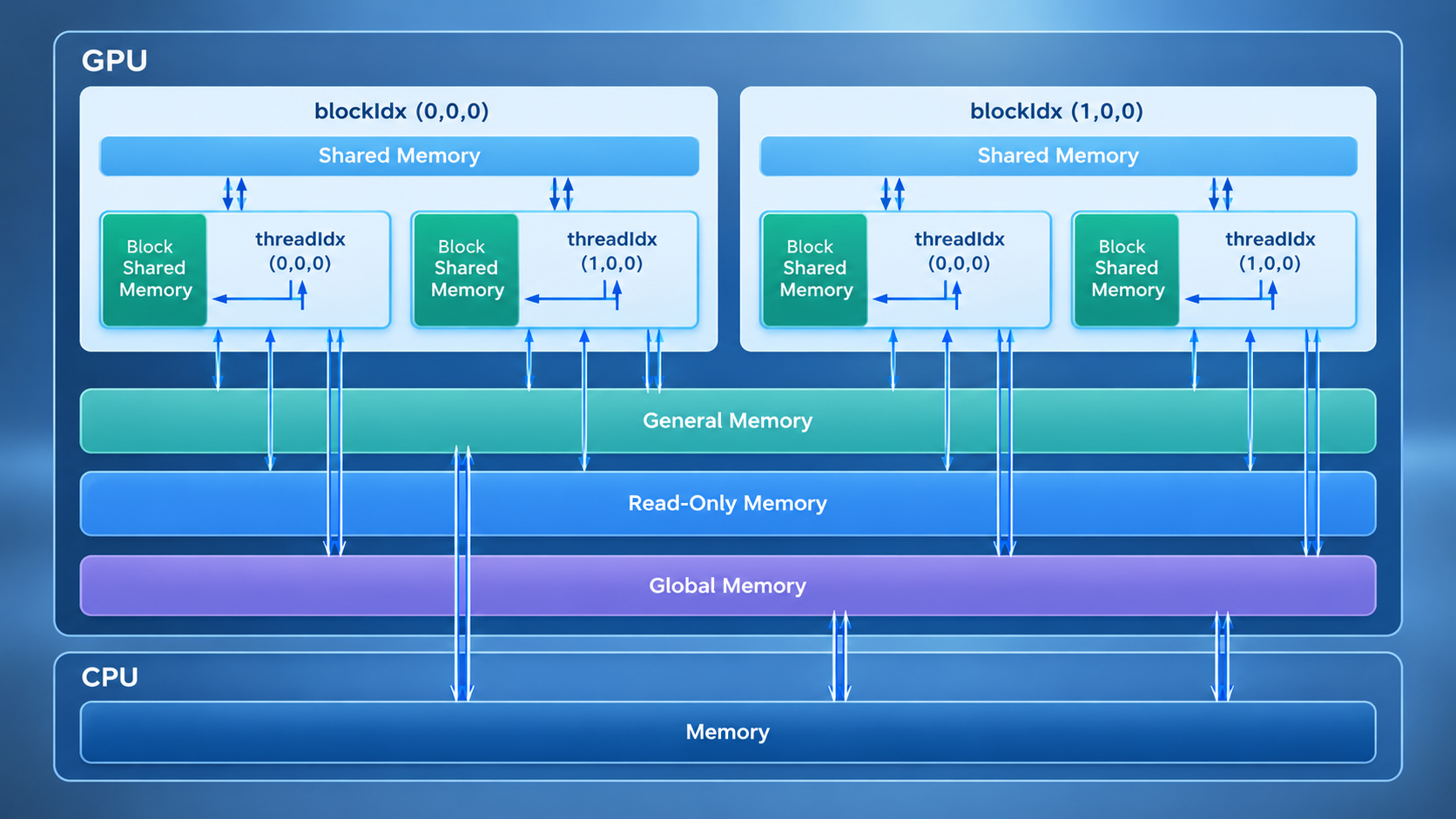
Modern GPUs rely on a memory hierarchy to balance capacity, latency, bandwidth, and cost. CUDA exposes several memory spaces, each designed for different access patterns and lifetimes.
Understanding how global memory, shared memory, constant memory, registers, local memory, and caches work is essential when optimizing CUDA applications. The right memory strategy can reduce latency, improve memory throughput, and help the GPU keep its execution units busy.
🧠 Understanding the CUDA Memory Hierarchy #
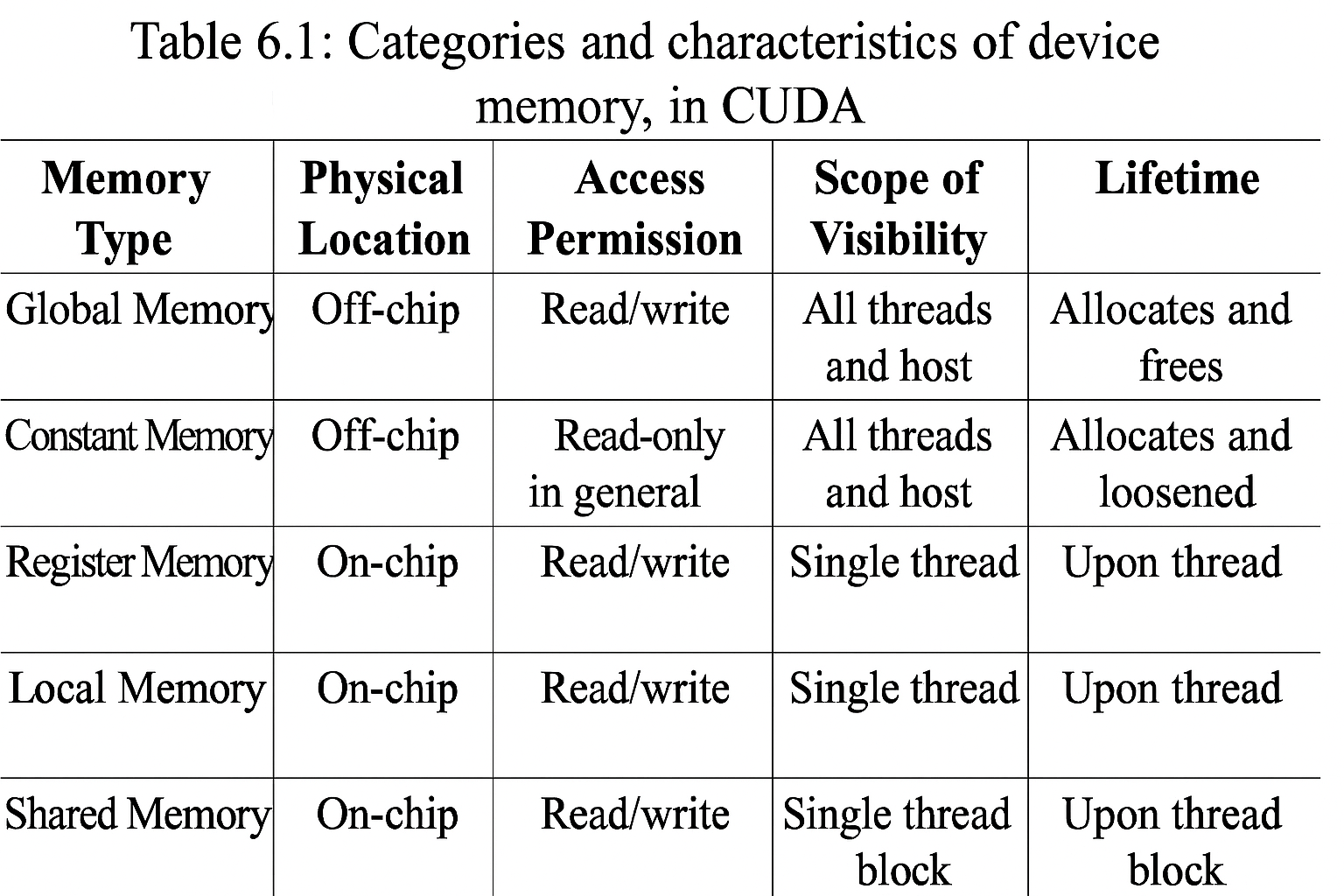
CUDA memory spaces differ mainly in where the data is stored, who can access it, how long it remains available, and how quickly it can be accessed.
In general, smaller on-chip memory spaces provide lower latency, while larger memory spaces provide greater capacity at a higher access cost.
The main CUDA memory spaces include:
- Global memory — large device memory accessible by all threads.
- Shared memory — fast on-chip memory shared by threads in a block.
- Constant memory — read-only memory optimized for broadcast-style access.
- Texture and surface memory — memory spaces designed around specialized access patterns.
- Registers — fast, thread-private storage.
- Local memory — per-thread storage that physically resides in device memory when required.
- L1 and L2 caches — caches that reduce the effective latency of memory accesses.
🌐 Global Memory #
Global memory is the primary large-capacity memory space available to CUDA kernels. It is accessible by threads across the device and is commonly used for application data exchanged between the host and GPU.
Typical characteristics include:
- Accessible by threads across the GPU.
- Located in device DRAM, outside the GPU compute cores.
- Provides large capacity but considerably higher latency than on-chip memory.
- Commonly allocated with
cudaMalloc()and released withcudaFree(). - Data can remain available across kernel launches until explicitly released or otherwise managed.
For performance-sensitive applications, memory access patterns matter. Coalesced accesses allow threads in a warp to use global memory bandwidth more efficiently.
📦 Static Global Device Memory #
CUDA also provides statically declared device variables through the __device__ qualifier:
__device__ T x;     // Single variable

__device__ T y[N];  // Fixed-size array
These variables reside in global device memory and can be accessed by device code.
The host does not access them through ordinary C++ pointers. Instead, CUDA provides APIs such as:
cudaMemcpyToSymbol()
cudaMemcpyFromSymbol()
These functions allow host code to transfer data to and from statically allocated device symbols.
📌 Constant Memory #
Constant memory is a read-only memory space intended for values that are shared across threads.
CUDA provides up to 64 KB of constant memory per device. Constant memory is cached, making it particularly effective when threads in a warp access the same address.
A typical declaration looks like this:
__constant__ float coefficients[256];Host code can initialize the data with:
cudaMemcpyToSymbol(coefficients, data, sizeof(data));Constant memory works well for:
- Kernel parameters.
- Configuration values.
- Small lookup tables.
- Coefficients shared by many threads.
Its performance advantage is strongest when access is uniform across a warp. If threads request many different constant addresses, the benefit can be reduced.
🖼️ Texture and Surface Memory #
CUDA also provides texture and surface memory interfaces for specialized data-access patterns.
Texture memory is particularly associated with read-only data and hardware-supported caching behavior. It has historically been useful for graphics, image processing, and applications involving irregular spatial access patterns.
Surface memory provides similar access to device memory but supports writes through surface operations.
Common applications include:
- Image processing.
- Computer vision.
- Graphics workloads.
- Spatially organized data.
- Algorithms with irregular access patterns.
The importance of these interfaces has evolved across CUDA GPU generations, so modern applications should evaluate them alongside ordinary global-memory access and the available cache hierarchy.
⚡ Registers: The Fastest Thread-Local Storage #
Registers are the primary storage space for thread-local variables.
Each CUDA thread has its own register allocation. Registers provide very low-latency access, but the number available per SM is limited.
Consider this example:
const int n = blockDim.x * blockIdx.x + threadIdx.x;

z[n] = x[n] + y[n];
The variable n is a candidate for register storage because each thread computes and uses its own value.
Registers are ideal for:
- Loop counters.
- Temporary values.
- Frequently accessed scalar variables.
- Intermediate arithmetic results.
However, excessive register usage can reduce the number of active threads that fit on an SM. If register demand becomes too high, the compiler may also place some values in local memory.
🧳 Local Memory #
Despite its name, CUDA local memory is not physically located in a small private memory area next to each thread.
When a thread’s data is placed in local memory, it resides in device memory and therefore has substantially higher latency than register access.
Local memory can be used when:
- Register requirements exceed available resources.
- Certain local arrays cannot be efficiently kept in registers.
- The compiler cannot resolve an array’s indexing at compile time.
- Other compiler decisions require thread-local storage in memory.
This is why unexpectedly high local-memory usage can hurt kernel performance.
When optimizing a kernel, it is useful to inspect compiler-generated resource usage rather than assuming that every local variable occupies a register.
🚀 Shared Memory #
Shared memory is a fast, on-chip memory space shared by threads within the same thread block.
Unlike global memory, shared memory is physically close to the SM and provides much lower latency when accessed efficiently.
Typical uses include:
- Reusing data across threads.
- Tiling matrix operations.
- Cooperative algorithms.
- Reducing repeated global-memory accesses.
- Sharing intermediate results within a block.
For example, a group of threads can load data from global memory into shared memory once and then reuse it multiple times.
Shared memory is allocated per block, and its capacity is limited. Access patterns also matter because bank conflicts can reduce effective performance.
🧩 L1 and L2 Cache #
CUDA GPUs also use cache hierarchies to reduce the effective cost of accessing device memory.
L1 Cache #
The L1 cache is associated with individual streaming multiprocessors. It can reduce the latency of repeated or nearby memory accesses made by threads executing on the same SM.
L2 Cache #
The L2 cache is shared across the GPU. It sits between the SMs and device memory and can serve data requested by multiple SMs.
Together, these caches can make repeated global-memory accesses significantly cheaper than repeatedly fetching data from device DRAM.
The exact cache organization and configuration depend on the GPU architecture, so performance characteristics should be evaluated for the target GPU rather than assumed to be identical across generations.
🧮 Understanding Streaming Multiprocessors #
CUDA applications execute their kernels across Streaming Multiprocessors (SMs).
An SM provides the resources required to execute groups of CUDA threads, including:
- Registers.
- Shared memory.
- Cache resources.
- Warp schedulers.
- Integer and floating-point execution units.
- Special-function units.
- Tensor cores on supported architectures.
A kernel’s performance therefore depends not only on arithmetic throughput but also on how effectively it uses these limited per-SM resources.
📊 What Is SM Occupancy? #
Occupancy describes the ratio between the number of active warps or threads resident on an SM and the maximum number that the hardware can support.
Higher occupancy can help hide memory latency by allowing the SM to switch among more ready warps. However, maximizing occupancy is not automatically the same as maximizing performance.
A kernel with lower occupancy can still perform well if it has:
- Efficient memory access.
- High instruction-level parallelism.
- Good cache behavior.
- Appropriate register usage.
- Limited synchronization overhead.
For this reason, occupancy should be treated as one optimization metric rather than a universal target.
🔍 Querying GPU Properties with the CUDA Runtime API #
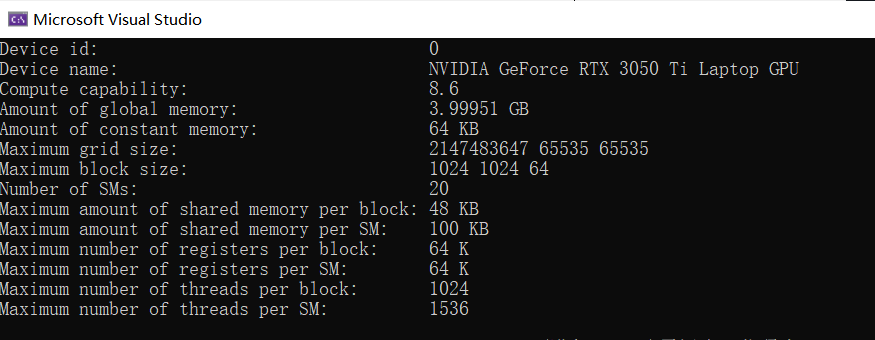
Before optimizing a CUDA application, it is useful to inspect the capabilities and resource limits of the target GPU.
The CUDA Runtime API provides cudaGetDeviceProperties() for this purpose.
#include <stdio.h>
#include <stdlib.h>
#include <cuda_runtime.h>

#define CHECK(call)                                                   \
do {                                                                  \
    const cudaError_t error_code = (call);                            \
    if (error_code != cudaSuccess) {                                  \
        fprintf(stderr, "CUDA Error: %s\n",                           \
                cudaGetErrorString(error_code));                      \
        exit(EXIT_FAILURE);                                           \
    }                                                                 \
} while (0)

int main(int argc, char *argv[])
{
    int device_id = 0;

    if (argc > 1)
        device_id = atoi(argv[1]);

    CHECK(cudaSetDevice(device_id));

    cudaDeviceProp prop;
    CHECK(cudaGetDeviceProperties(&prop, device_id));

    printf("Device name: %s\n", prop.name);
    printf("Compute capability: %d.%d\n",
           prop.major, prop.minor);

    printf("Global memory: %.2f GB\n",
           prop.totalGlobalMem /
           (1024.0 * 1024.0 * 1024.0));

    printf("Shared memory per block: %.2f KB\n",
           prop.sharedMemPerBlock / 1024.0);

    printf("Registers per SM: %d K\n",
           prop.regsPerMultiprocessor / 1024);

    printf("Max threads per block: %d\n",
           prop.maxThreadsPerBlock);

    return 0;
}
This program reports several hardware properties that are useful when reasoning about CUDA kernel resource usage.
🛠️ Choosing the Right CUDA Memory Space #
There is no single memory type that is best for every workload. The appropriate choice depends on access scope, data lifetime, capacity requirements, and access patterns.
| Memory space | Scope | Typical characteristics | Common use |
|---|---|---|---|
| Registers | Thread | Very fast, limited | Thread-local variables |
| Shared memory | Block | Fast, on-chip, limited | Data reuse and cooperation |
| Constant memory | Device | Read-only, cached | Shared parameters and lookup tables |
| Global memory | Device | Large capacity, higher latency | Main application data |
| Local memory | Thread | Device-memory backed | Register spills and local arrays |
| L1 cache | SM | Small, low-latency cache | Frequently reused data |
| L2 cache | Device | Shared cache | Reducing device-memory traffic |
| Texture memory | Device | Cached access interface | Images and spatial data |
| Surface memory | Device | Read/write access interface | Graphics and image operations |
The key is to match the memory space to the workload instead of assuming that moving everything into the fastest available memory will automatically improve performance.
🎯 Final Thoughts #
CUDA’s memory hierarchy gives developers several ways to control how data moves through the GPU.
Registers provide fast thread-local storage. Shared memory enables efficient cooperation within a block. Constant memory works well for read-only values shared across threads, while global memory provides the capacity required for large datasets. Local memory and caches also influence how efficiently kernels use the underlying device-memory system.
Understanding these relationships is one of the foundations of CUDA optimization. Once you know where data lives, who accesses it, and how frequently it moves, you can make better decisions about memory layout, access patterns, register usage, shared-memory tiling, and kernel occupancy.